VendorWorth Event Planner
Plan your event, record what happened, and compare your results.
$9.99 introductory price • One-time digital workbookWhat you get
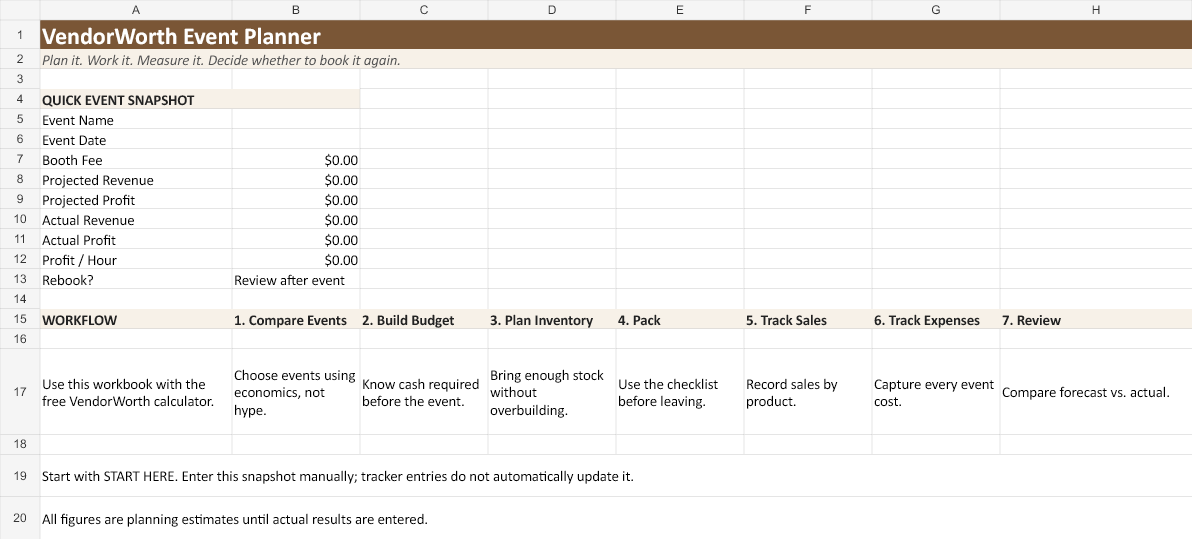
An Excel workbook with a START HERE guide and 10 planning and tracking sections: Dashboard, Event Comparison, Pre-Event Budget, Inventory Planner, Packing Checklist, Sales Tracker, Expense Tracker, Product Performance, Post-Event Review, and Annual Dashboard.
How it works: Built-in formulas calculate amounts within individual tabs. You enter or transfer event and product totals between tabs manually; tracker entries do not automatically populate the dashboard.
These are actual views of the workbook template with blank inputs and zero starting values. Select an image to view it at full size.

Easy to start, with safeguards built in
Open the .xlsx file in desktop Microsoft Excel, save a working copy, and begin with START HERE. Use a separate copy for each event and keep an annual master. Formula cells are protected against accidental edits; entry cells remain editable. Numeric validation helps catch negative quantities and fractional unit counts. Protection can be removed in Excel without a password when you need to extend the prepared ranges.
Prepared capacity: 10 comparison events, 20 inventory/product entries, 100 sales rows, 80 expenses, and 30 annual events. Break-even forecasts come from the free website calculator and are entered into the workbook manually. No macros or subscription are required.
Calculation and protection checks passed in desktop Excel 16.0 for Windows. Google Sheets, mobile Excel, and Mac Excel have not been verified. Worksheet protection prevents accidental changes; it is not encryption. Pasting can bypass Excel input validation, so review pasted entries.
Checkout and delivery: Buy from DigitalLeverageLab on Etsy. Your ZIP download is available on Etsy after payment confirmation. For purchase support, contact the shop through Etsy Messages.
Use the free calculator